Your Time, Your Privacy,
Your PriTime
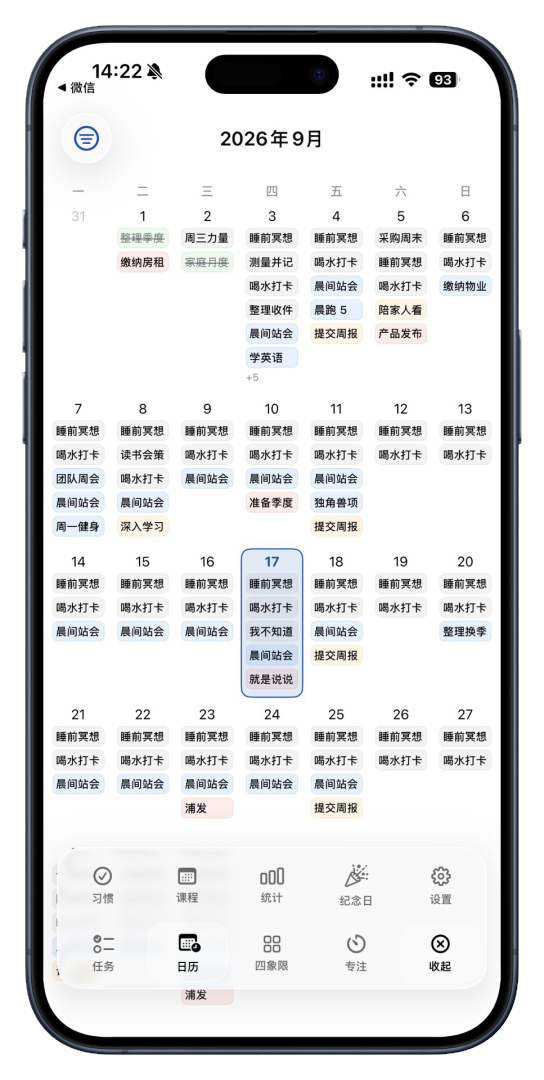
PriTime is a self-hostable to-do list app. Its ecosystem spans fully native clients (macOS, iOS, Android, Windows, Web), with lists, tags, the Eisenhower matrix, calendar, class schedule and focus time. The backend API + Web app are open source and free — your data, your privacy.

Trusted by Over 100,000 Users Worldwide
One Data Source, Three-Platform Ecosystem
A unified Rails JSON API lets the Web, desktop and mobile clients share the same data — manage tasks anytime, anywhere.
PostgreSQL Database
Single source of truth · your data
Backend API
Rails 8.1 · Puma · Kamal
Web
Vue 3 · Vite · Pinia
Desktop Client
SwiftUI · AppKit · WinUI
Mobile Client
SwiftUI · Jetpack Compose
Source Available · Transparent · Self-hostable
The PriTime backend API and Web client are source-available and self-hostable. We never collect your data and never lock you into a cloud. Personal, research and other non-commercial use only — all commercial use is prohibited.
PolyForm Noncommercial 1.0.0
The code is published under the PolyForm Noncommercial 1.0.0 license: read, modify, learn from and self-host it freely.
Open Source & Free
The Web client is open source and free — use every feature online at no cost, with no ads.
Self-host It
The backend is a standard API app you can deploy to your own server, intranet or home lab in one click. Web and App also support self-hosting.
# 1. Clone the repo
git clone https://github.com/SoloDevCool/Open-PriTime.git
cd Open-PriTime

# 2. Start the backend API
cd todo_api
bundle install
cp .env.example .env     # Edit DB_HOST / DB_USERNAME as needed
rails db:create db:migrate
bin/rails server           # Listen on :3000

# 3. In a new terminal, start Web
cd ../todo_web
npm install
npm run dev                  # Visit http://localhost:5173
Paid Native Clients, Free Web Forever
Desktop (macOS / Windows) and mobile (iOS / Android) clients use a one-time purchase — buy once, use forever. The Web client in the browser is completely free.
Open Source (Free)
Self-hosted backend + Web client. Great for personal use and self-hosters.
Windows Bundle
One-time purchase of the Windows client, limited-time offer with free future upgrades.
Apple Bundle
One-time purchase of the macOS client, limited-time offer with free future upgrades.
All Platforms
One-time purchase of every platform client — the most complete choice.
Everything You Need, Nothing You Don’t
Tasks, lists, tags, priorities, reminders, recurrence, trash… all designed to boost your productivity.
Task Management
Create, edit, complete, delete and drag to reorder; supports description, priority and tags.
Task Lists
Group tasks into lists, with built-in Work / Personal / Study defaults.
Color Tags
Custom colored tags to filter tasks quickly.
4-Level Priority
None / Low / Medium / High, paired with the Eisenhower matrix view.
Smart Reminders
On time / 5 min / 30 min / 1 hour / 1 day before — multiple options.
Recurring Tasks
Never / Daily / Weekdays / Weekly / Monthly / Yearly for any rhythm.
Trash
Soft delete, restore and empty in one click — never lose important tasks.
Focus Mode
Built-in Pomodoro timer and focus mode to help you do one thing at a time.
Global Search
Search across titles, descriptions and tags — nothing gets lost.
AI Assistant
Create tasks and plan lists with a single sentence — AI turns ideas into to-dos.
Habit Tracking
Track daily habits and streaks, and watch your consistency grow.
Statistics
Completion rates, trends and distributions at a glance.
Class Timetable
Manage courses by semester — classes and tasks in one place.
List Sharing
Share lists with others for easy collaboration and sync.
Push Notifications
Due reminders pushed automatically — never miss what matters.
Anniversary
Keep track of important days with automatic countdowns.
They Manage Every Day with PriTime
Different professions, different needs — there is a workflow for everyone.
“Three projects and dozens of to-dos — PriTime's lists and priorities keep everything straight. Due reminders mean I never miss a deadline.”
“My data stays mine: self-hosted, with tasks, habits and stats all in my own database. I can assure my clients their info is safe too.”
“Timetable and to-dos in one app, and the Eisenhower matrix shows exactly what to do first. It saved my procrastination — and my finals.”
“Finally a tool this good — kudos to the developers! Please keep the current quality, don't rush new features. Hope you keep growing!”
“We standardized on PriTime for task management. Onboarding is faster and "I can't see that task" issues basically disappeared.”
“As a freelancer I switch between client projects constantly. PriTime's multi-device sync makes context switching smooth and instant.”
“Topic library, shooting schedule and publishing checklist all live in PriTime, plus habit tracking keeps me posting daily. One app runs my whole content workflow.”
“What won me over is privacy: open source, auditable, self-hostable. My task data never leaves my own hands.”
“I've tried a dozen todo apps — PriTime is the smoothest so far: open-source free Web, one-time-purchase desktop, no ads, no tracking.”
“Backlog, sprint planning and review reminders all flow through PriTime. The matrix view makes "what's next" obvious — team communication got much cheaper.”
“Imported my timetable, set weekly recurring prep tasks, and had the whole semester organized in the first week. Student-friendly is no joke.”
“One list per side project with its own tags, client tasks clearly separated. I never lose context when switching projects anymore.”
“Recurring tasks and early reminders are brilliant — on-call rotations, weekly reports, certificate renewals all schedule themselves. Time goes back to coding.”
“Family lists, kids' vaccine reminders and our anniversary countdown — one app for the whole family. Clean interface, easy even for grandparents.”
“I track my clients' training plans with habit streaks — who's consistent is obvious at a glance. Data doesn't lie, and renewals went up.”
“Statutes of limitations and court dates leave zero room for error. Calendar view plus layered reminders keep every deadline clearly scheduled.”
Modern, Solid, Easy to Deploy
Each client plays to its strengths, collaborating through one REST API.
Backend API
- Framework
Ruby on Rails 8.1 - Database
PostgreSQL 14+ - Server
Puma - CORS
rack-cors - Deploy
Docker · Kamal
Desktop / Mobile App
- Framework
Fully native (Swift / Kotlin / C# etc.) - State
Native state management - Network
Native HTTP / URLSession / OkHttp - Storage
Native persistence (Core Data / Room / SQLite) - Window
Native window management
Web Frontend
- Framework
Vue 3 - Build
Vite 6 - State
Pinia - Router
Vue Router 4 - Request
axios
Frequently Asked Questions
Common questions about pricing, data and deployment — answered.
Is PriTime free?
The Web client and backend API are open source and free — self-host them at no cost. Desktop and mobile clients are separate paid apps, with no ads and no tracking.
Is my data safe?
The source is open and auditable. The backend API and database can be deployed entirely on your own server or intranet — your data stays yours, never uploaded to any third-party cloud.
Which platforms are supported?
Web, macOS, Windows, iOS and Android clients are available. All clients share the same data through a unified backend API — one dataset, synced everywhere.
How do I deploy my own PriTime?
Clone the repo, start the Rails API and the Web frontend, and you are up and running. Docker images and Kamal one-command deploys are also supported — see the deploy commands in the open source section above.
How do reminders and push work?
On-time and 5 min / 30 min / 1 hour / 1 day early reminders are supported, combined with Web Push so due tasks reach you automatically.
Can I use it commercially?
The code is published under the PolyForm Noncommercial 1.0.0 license for personal learning, research and non-commercial self-hosting. For commercial licensing, contact the author via GitHub Issues.
Ready to Take Control of Your Time?
Source available, cross-platform, synced across all clients. Your Time, Your Privacy, Your PriTime — waiting for you.
Get Started